
PhotoLikr.
Review photos fast.
Keep your best shots.
An ultra-fast photo viewer for Windows. See your photos large, zoom into the details and choose the ones worth editing or sharing.
Free viewing and photo selection.
Compare Free and Pro · Version 2026.0.0.12 · 12 MB
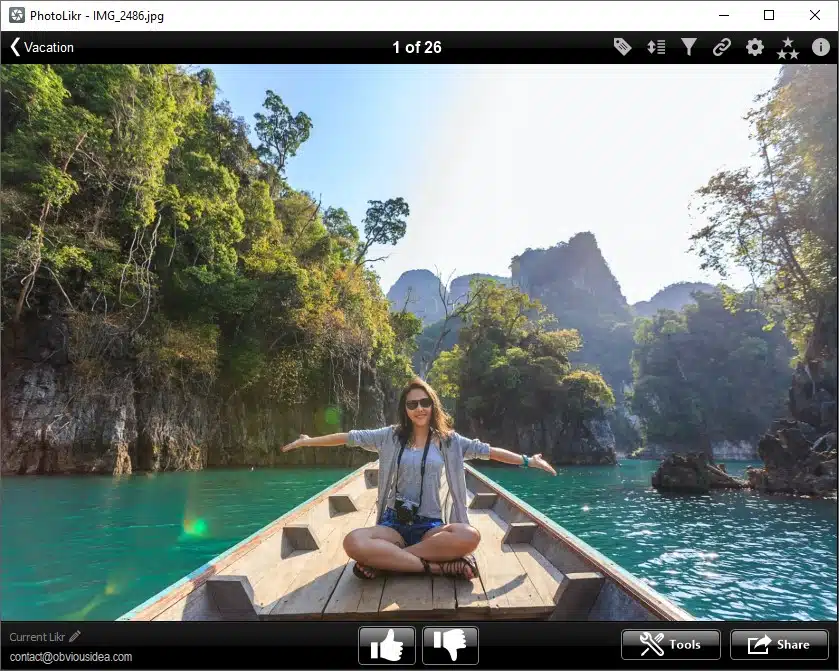
See the photo large
Switch to full screen with F11.
Keep the view clear
Show or hide toolbars with F12.
Choose what comes next
Folder, Google Photos, Google Drive or Dropbox.
Check the detail that makes the difference.
Zoom in to check sharpness and expressions. Inspect the details before choosing your favourites.
Zoom where you need it
Hold the right mouse button on the photo for a closer look. Release it to return to the fitted view and continue browsing.
Move through similar shots
Use the left and right arrow keys to review photos in turn. Preview caching and preloading help prepare images for browsing.
Bring up the information
Open the EXIF panel when you need camera settings and image metadata alongside the photo.
Browsing speed depends on image size, file format, cache settings and your computer.
Turn a folder of photos into a useful shortlist.
Photo culling means reviewing photos and selecting the ones to keep for the next step. You make the choices; PhotoLikr helps you organise the selection.
01
Open your photo folder
Start with a shoot, a trip or a family event. Browse the photos with the left and right arrow keys.
02
Pick your favourites
Vote with the up and down arrow keys. Use keys 1–5 to assign stars, then filter your selection.
03
Put the selection to use
Copy the chosen photos into a folder for editing or printing. Or upload them to your preferred cloud service.
←→ Browse
↑↓ Vote
1–5 Rate

Take only the photos you selected.
Use your ratings to prepare a smaller set for your photo editor, a print order or a shared album.
The copy tool gives your selection its own folder. Your next step starts with the photos you chose.
Your favourites, ready for their next destination.
Keep the selected photos together for editing, printing or sharing. Choose a local folder or one of the supported cloud services.
A folder on your PC
Choose a minimum star rating and copy the matching photos into a separate folder.
Google Photos
Upload your selection to Google Photos. Manage album sharing and access from your Google Photos account.
Google Drive
Upload selected photos to Google Drive for online storage and sharing through your Google account.
Dropbox
Upload selected photos to Dropbox and use its sharing tools to send a link.
Cloud uploads require an account with the chosen service. Storage and sharing permissions depend on that service. See the PhotoLikr release history for integration updates.
Select with Free. Upload larger photos with Pro.
Both versions let you review photos, zoom, rate and prepare a local selection. Pro adds control over the dimensions used for cloud uploads.
PhotoLikr Free
For reviewing and selecting your photos.
View and inspect
Full screen, zoom and EXIF information.
Rate and select
Votes, star ratings, filters and copy to folder.
Upload smaller images
Cloud upload uses the 800 × 600 resize setting.
PhotoLikr Pro
For sharing your selection at larger dimensions.
Everything in Free
Keep the same photo selection workflow.
Choose upload dimensions
Set custom dimensions above 800 × 600.
Use original image dimensions
Unlock the original-size option for uploads.
The size restriction applies to cloud upload settings, not to the size of photos you can view. Cloud uploads are prepared as JPEG images. The original-size option keeps image dimensions. Uploads use JPEG format, and some metadata may not be retained.
Check your formats. Download for Windows.
JPEG, HEIC, RAW & more
PhotoLikr supports JPEG, TIFF, PNG, GIF, BMP, WebP, AVIF, HEIC / HEIF, JPEG XL, JPEG 2000, JPEG XR and camera RAW.
Supported camera RAW extensions include DNG, CR2, CR3, CRW, ERF, RAF, MRW, NEF, ORF, PEF, SR2 and SRF. Individual file support can depend on installed codecs. Read the Windows image codec guidance.
Version & licence
PhotoLikr runs on Windows 7, 8, 10 and 11. Start with a sample folder containing the formats you use.
Latest release: 2026.0.0.12
18 September 2026 · Approximately 12 MB
Check the PhotoLikr Pro checkout for the current price and purchase terms. For help with features or your licence, visit our PhotoLikr support forum.
Before you download.
Who is PhotoLikr for?
PhotoLikr is for photographers and photo enthusiasts who want to review a folder and choose their best shots before editing, printing or sharing.
Can I view photos full screen?
Yes. Press F11 to toggle full screen. Press F12 to show or hide the toolbars. Hold the right mouse button on a photo to zoom into a detail.
Can I select photos without uploading them?
Yes. The local workflow lets you review, rate, filter and copy photos to another folder on your PC. Cloud upload is optional.
What changes when I buy PhotoLikr Pro?
Free includes viewing, zoom, ratings, filtering and local selection. Its cloud upload resize setting is 800 × 600. Pro unlocks larger custom upload dimensions and the original-size option. Both use the same application; enter your licence key to unlock Pro.
Can I use ratings with Lightroom?
PhotoLikr supports XMP star ratings. Check rating exchange on copies of a few files first. Confirm compatibility before relying on direct updates to your current Lightroom catalog.
Choose the photos you want to keep.
Open your next folder in PhotoLikr and build your selection.
We develop PhotoLikr at ObviousIdea. See our release history for the latest improvements.
Get PhotoLikr
Windows photo viewer
2026.0.0.12 · 12 MB
Free vs Pro
Buy PhotoLikr Pro
Export destinations
Version history