
GreenCloud Yazıcı
Preview every page before printing.
Choose GreenCloud in the Print menu of any application. Review all pages, remove pages you do not need, place 2 or 4 pages on each sheet, then print or save as PDF.
The Free edition limits the number of pages and adds a small GreenCloud mark. The Pro edition removes these limits.
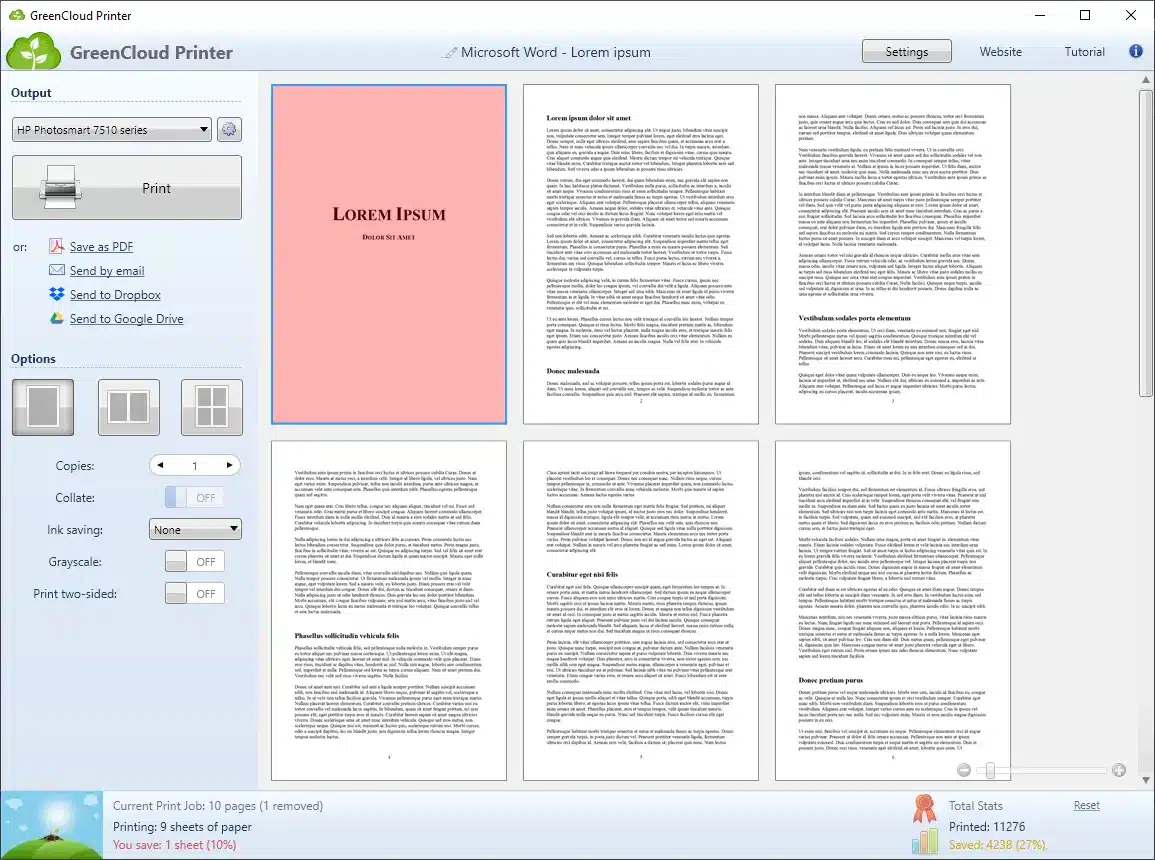
Review, adjust, then print or save.
1
Choose GreenCloud
Open the Print menu in Word, your browser or a PDF reader, then select GreenCloud as the printer.
2
Adjust your pages
Review the pages, remove the pages you do not need and choose 1, 2 or 4 pages per sheet.
3
Print or save a PDF
Send the document to the selected Windows printer or save it as a PDF.
Review and remove unwanted pages.
The print preview helps you find blank pages, advertisements, duplicate headers and incorrect page ranges. Select the pages to print before you continue.
9 pages received → 5 pages kept
Example: four unwanted pages are marked in red. You choose which pages to print.
Use fewer sheets.
Print only useful pages.
Remove unwanted pages before printing. Place 2 or 4 document pages on each sheet for documents, reference copies or drafts.
Use two-sided printing when your printer and driver support it. Choose one of three ink-saving levels to reduce the ink used for printed text.
GreenCloud usage data was transferred with user consent. The statistics show an average saving of 35% and savings of up to 60%, depending on the print job. Results vary.
8 pages → 4 sheets at 2 pages per sheet
Example for an eight-page document printed on one side of each sheet.
Statistics from GreenCloud usage data.
These statistics use data transferred with user consent. Results depend on the documents, printers and selected settings.
Choose the edition that meets your needs.
Ücretsiz
€0
Test the Free edition with your documents and printer.
- Limited number of pages
- A small watermark on pages
- No detailed printing statistics
Pro
€29.99
Price includes VAT. Final currency and applicable tax are shown at checkout.
- Print and save unlimited pages
- Sayfalarda su işareti yok
- Detailed printing statistics
Your licence is valid for the lifetime of the purchased major version. View purchase terms.
Volume licences for organisations
Contact us for volume licences, customised versions, enterprise statistics and deployment information.
Does GreenCloud work with my printer?
GreenCloud displays a print preview before sending the job to your Windows printer.
Two-sided printing is available when the selected printer and driver support it. You can create a PDF without a printer.
Information before download
Which Windows versions does GreenCloud support?
GreenCloud is available for Windows 7, 8, 10 and 11. Test the Free edition with your applications and printer before buying. For macOS, Linux, Windows on ARM or Windows Server, contact us to check compatibility before buying.
Does duplex work with every printer?
Duplex printing requires a compatible printer and driver. GreenCloud cannot add duplex printing to unsupported printer hardware.
Can I create a PDF from Word?
Yes. Select GreenCloud in the Print menu, then select Save as PDF. A PDF can contain 2 or 4 document pages on each PDF page. Grayscale and number-of-copies settings apply only when printing on paper.
How much paper and ink will I save?
GreenCloud usage data shows an average saving of 35% and savings of up to 60%. This data was transferred with user consent. Your results depend on your documents, printer and settings.
Where can I find help?
Read the GreenCloud Printer FAQ for help with installation, PDF creation and printing. The FAQ also explains the /silent and /verysilent installation options. Bizimle iletişime geçin for deployment help.
Available version: 7.9.4.0 · 2 February 2024 · 16.5 MB. Versiyon geçmişi · Support FAQ.