Windows screenshot manager

Capture the moment. Index the archive.

Light Capture turns screenshots into a searchable local archive with OCR, native AQS search, local AI tagging, and batch processing.

Built for professionals who treat screenshots as working files: evidence, references, UI states, invoices, bugs, research notes, audit trails, and visual memory.

v2026.5.14.358  · Updated May 14th, 2026

✓ Free download✓ No subscription✓ 100% local (GDPR)✓ Windows 10 & 11
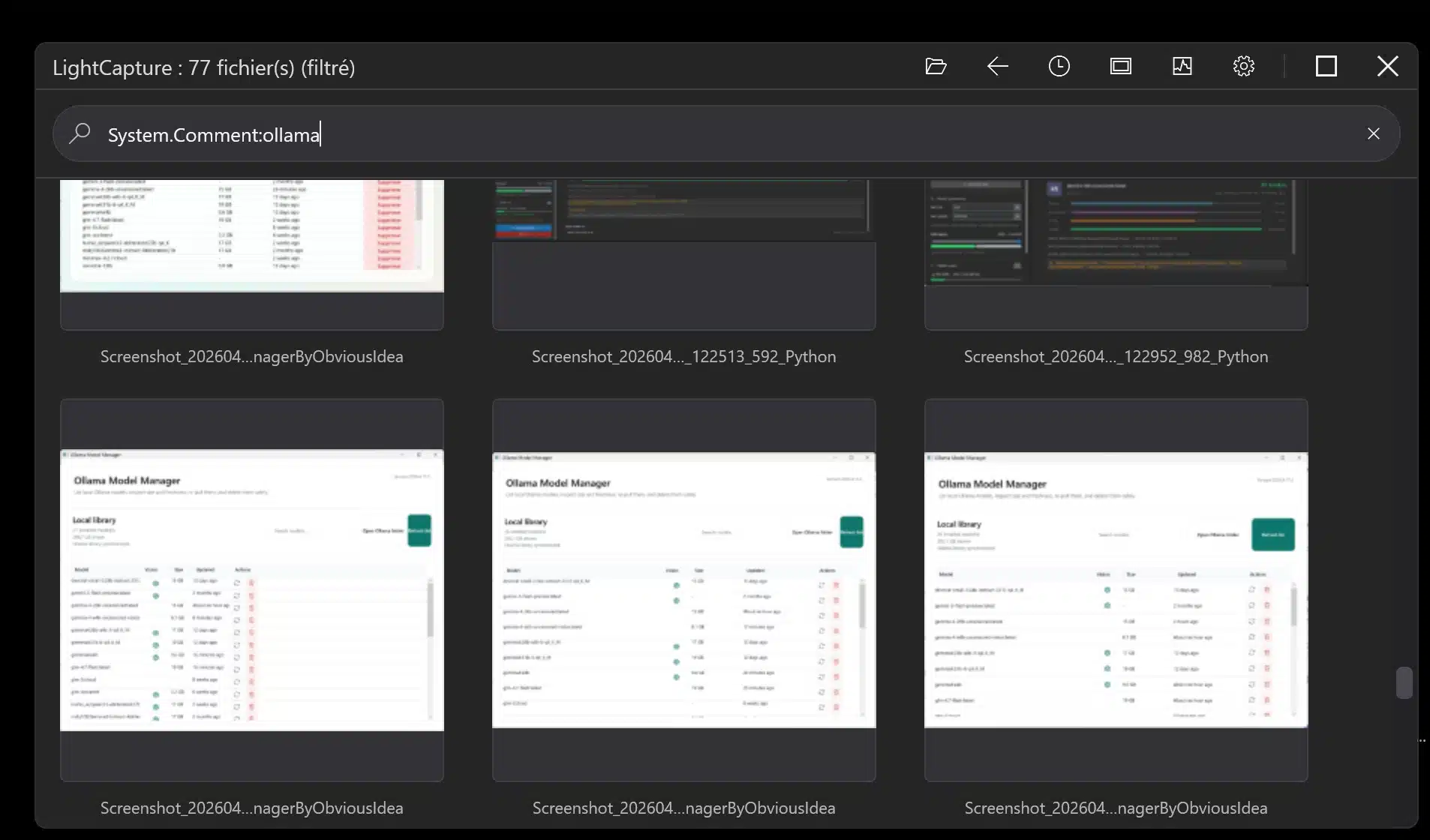
Real Light Capture app screen showing AQS search for Ollama inside screenshot comments
Detected metadataSource app: Ollama Model ManagerDate: 2026-04-25 11:54Match: System.Comment:ollama
Real Light Capture screen: AQS search filtering screenshots with System.Comment:ollama.

96-512 pxthumbnail scale for visual file browsing

AQSadvanced Windows-compatible search syntax

OCRsearch inside existing screenshots

Local AIprivate tagging with Ollama models

vs. Windows built-in tools

Already using Snipping Tool?
That’s exactly who LightCapture is built for.

Snipping Tool captures the moment. LightCapture captures it e makes sure you can find it six months laterby what’s written inside the image, by comment, by date, or by which application was open.

Windows Snipping Tool

  • No search. Screenshots pile up with generic auto-generated names.
  • Text inside images is invisibleyou can’t find a screenshot by what it shows.
  • No comments or tags. Context lives in your memory, not with the file.
  • No retroactive indexing. Your existing archive stays permanently unsearchable.
  • No AI assistance. Every screenshot is equally anonymous.

LightCapture

  • AQS search across filename, OCR content, comments, date, source app, and folder.
  • OCR indexingfind screenshots by the text written inside them.
  • Windows metadata comments stay attached to the file, app-independent.
  • Batch OCR retroactively indexes your entire existing archive.
  • Local AI with Ollamaprivate auto-tagging, zero cloud upload.

Cloud tools

Your screenshots can travel through third-party servers.

For legal, expert, audit, and regulated work, a screenshot can contain confidential documents, accounts, contracts, code, or private evidence.

LightCapture local

Neural processing can stay on your machine.

With local Ollama models, AI tagging can run with zero outbound image transfer. Light Capture can detect a local Ollama instance and unlock advanced local AI workflows.

Product workflow

The screenshot is only the beginning.

Most tools stop after capture. Light Capture focuses on what happens next: where the file goes, what it contains, how it is described, and how quickly it can be found later.

Screenshot workflow

1. CaptureGrab screen states, references, bugs, invoices, and visual notes.
2. EnrichAdd comments, Windows metadata, OCR text, and optional AI tags.
3. SearchUse filename, content, comment, date, folder, and AQS syntax.
4. ReuseOpen, review, resize, share, document, or export selected images.

Capture modes

Every capture mode. One searchable archive.

From quick region grabs to full-length scrolling captures — all output lands in a structured, OCR-indexed, instantly searchable folder.

Fullscreen

Capture the entire display in one keystroke. Ideal for desktop states, error dialogs, and full-context references.

Region selection

Draw a precise area with crosshair accuracy. The crop lands directly in the archive without extra save dialogs.

Window capture

Capture a specific application window with clean edges. Useful for UI documentation, comparisons, and bug reports.

Unique

Scrolling capture

Capture entire web pages, long documents, or extended chat threads as a single stitched imagewith full OCR indexing.

Auto-save + naming

Captures land in a configured folder with structured filenames. No save dialogs, no lost files, no naming decisions.

Instant annotation

Add a Windows metadata comment right after capturebefore context is lost. Searchable immediately from the archive.

Search dimensions

Four independent layers — all queryable together.

OCR text

Every word visible inside the image — dialog boxes, error messages, document content, UI labels.

AI Vision

Objects, colors, UI state, scene context — described in your professional vocabulary by a local Ollama model.

Metadata & comments

Manual or AI-generated notes stored in standard Windows metadata — attached to the file, independent of any app.

File properties

Source application, capture date, folder, filename — combined with AQS for precise multi-criteria queries.

All four layers are queryable together in a single AQS search expression.

AQS examples

A search language for real work.

Alternate between business queries such as invoices, urgent errors, source applications, OCR content, and customer folders.

Search demo

OCR: invoicecomment: urgentfolder: legaltype: screenshot
invoice-dupont-january.pngOCR keyword and client comment matched
outlook-contract-signature.pngSource application and OCR content matched
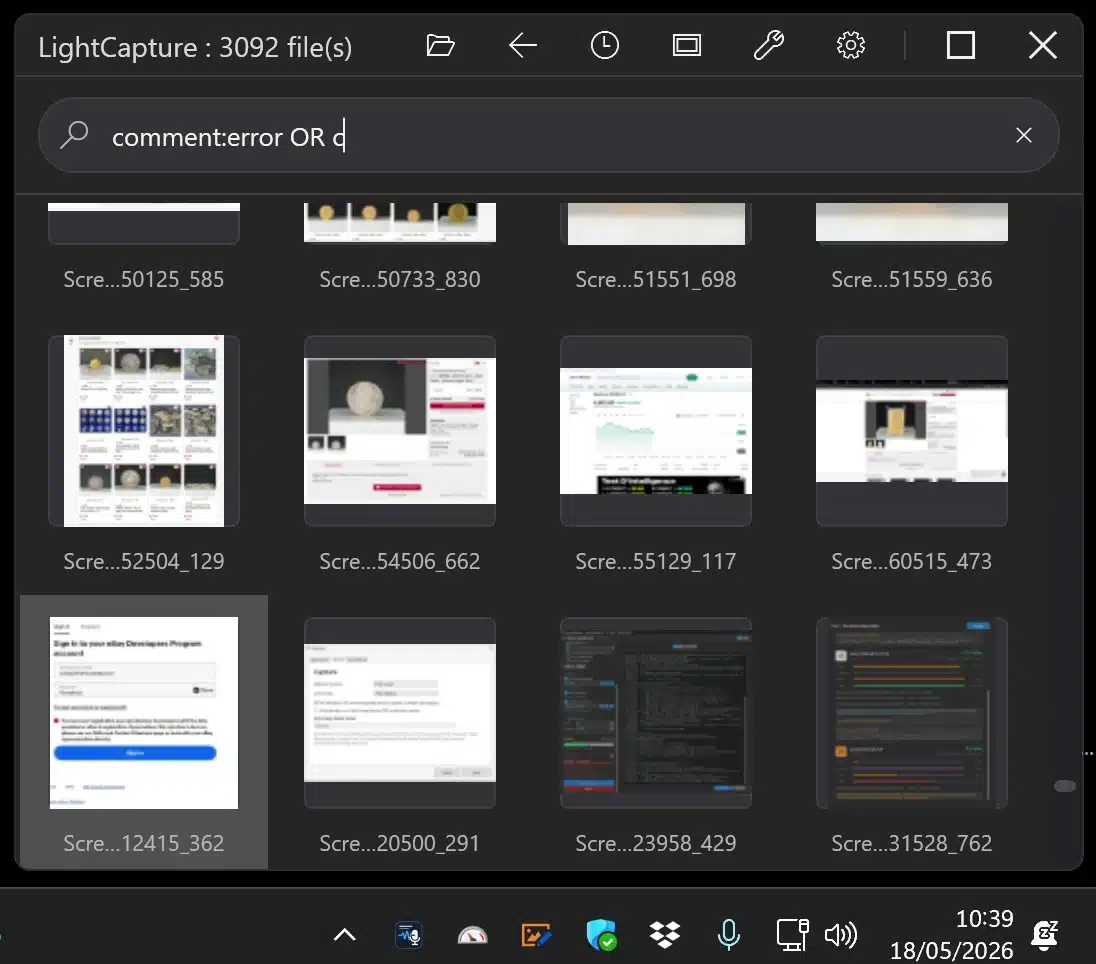
Real LightCapture AQS search — 82 screenshots filtered by comment:error OR comment:fail AND date:lastmonth

Real search: comment:error OR comment:fail AND date:lastmonth82 files

Live demo

See AQS search in action.

Real LightCapture sessionfiltering 82 screenshots by comment and date with a single AQS query.

Query shown: comment:error OR comment:fail AND date:lastmonth82 results, instant filtering

Private AI with Ollama

Local AI that understands what your screenshots show.

OCR finds text inside images. AI Vision goes further: Ollama analyzes each screenshot and generates a full description of what it shows — the application, UI state, visible objects, dominant colors, and scene context. That description is written directly into standard Windows metadata.

The key is your prompt and your vocabulary. Configure LightCapture with your professional thesaurus — legal terms, medical codes, product references, project names — and the AI generates descriptions using the exact words you will actually search for later. A lawyer gets descriptions in legal vocabulary. A developer gets UI and error terminology. A researcher gets domain-specific labels.

The result: every screenshot becomes findable by content, object, color, source application, or professional category — even if you captured it two years ago with no annotation at all.

Local AI checklist

  • AI Vision — describes objects, colors, UI elements, and scene context visible in each screenshot.
  • Professional thesaurus — configure your vocabulary so descriptions use the terms you actually search for.
  • App-source filtering — combine AI descriptions with AQS to filter by source app, date, or folder in one query.
  • Private: no image leaves your machine. No per-image cloud fee.
  • Best performance with a capable NVIDIA GPU, also runs CPU-only.

Open standards

Your data stays with your files.

Light Capture does not need to lock comments and tags inside a closed database. Useful information can be written into standard Windows metadata, so if you uninstall the app, your context remains attached to your files.

Already have thousands of screenshots? Batch OCR can retroactively index your entire existing archive in one passno manual work, no file reorganization. Your old captures become searchable overnight.

Tool comparison

How LightCapture compares.

Not all screenshot tools are built for the same job. If searchability and archival quality matter, the differences become clear quickly.

LightCapture: freeSnagit: $62.99 one-timeScreenpresso Pro: €29.95
Feature LightCapture Snipping Tool ShareX Screenpresso Snagit
AQS / full-text search
OCR content indexingPartial
Batch OCR on existing folders
Local AI tagging (Ollama)
Windows metadata (no lock-in)
Scrolling capture
100% local / GDPR-safePartial
GratisFreemiumPaid

Perfect companion

Light Capture works naturally with Light Image Resizer.

Capture and organize with Light Capture. Resize, convert, compress, watermark, rename, or prepare selected images with Light Image Resizer. Think of it as an add-on workflow for turning large screenshot sets into usable deliverables.

Who it’s for

Professionals who need to find the right screenshot later.

Legale & audit·  #legaltech

Lawyers, experts & auditors

A screenshot can become evidence. LightCapture makes every capture permanently searchable by content, comment, date, and source applicationwithout sending anything to a cloud server.

Works alongside existing legal workflows: case folders, audit trails, expert reports, and regulatory submissions.

Show every screenshot from the Dupont case, January 2025, with ‘contractin the image.

Design & dev

Designers & vibe coders

Capture UI states, AI-generated results, errors, regressions. Retrieve any screenshot by OCR content or taginstantly.

Every prompt result tagged ‘approvedfrom the landing page sprint.

Research & ops

Analysts & researchers

Batch-OCR entire archives retroactively. Turn years of accumulated screenshots into a structured, searchable knowledge base overnight.

Index my 4,000 research screenshots from last yearno manual work.