
TapoPanel : surveillance en direct de l’énergie et de la température de Tapo sur votre ordinateur.
TapoPanel affiche les relevés en puissance en direct des prises intelligentes Tapo P110, P115 et P110M, ainsi que la température et l’humidité des capteurs TP-Link Tapo tels que Tapo T310 et Tapo T315. Récupérez l’historique de vos prises et capteurs depuis le confort de votre ordinateur, sans ouvrir l’application mobile.
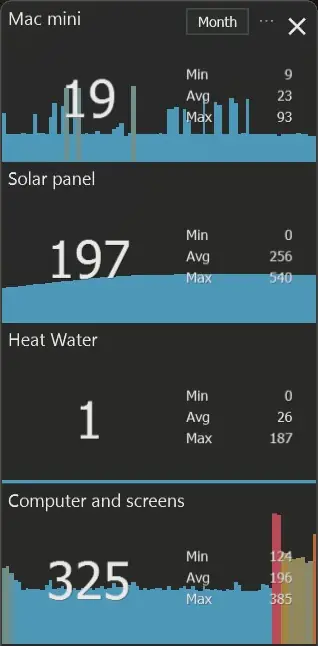
Watts en direct et température
Pas de changement d’application. Pas de déverrouillage de téléphone. Gardez l’énergie, la température et l’humidité visibles pendant que vous travaillez.
Conçu pour de vrais flux de travail
Production solaire, consommation du chauffage, équipements de bureau, température ambiante, humidité : gardez en vue les signaux qui vous tiennent à cœur.
Historique depuis votre ordinateur
Récupérez les relevés historiques de vos prises et capteurs Tapo par date, année, mois ou jour, puis exportez les fichiers CSV.
Qui utilise TapoPanel ?
Un seul outil, de nombreuses situations. Tout cela est centré sur le fait de voir les données d’énergie et de température sans avoir à attraper son téléphone.
Suivi de production solaire
Suivez la production réelle de panneaux via une prise Tapo avec la sortie actuelle en direct sur votre ordinateur de bureau.
Chambres de température
Suivez les relevés Tapo T310 ou Tapo T315 pour les vérifications de bureau, garage, serre, stockage ou confort.
Siège social
Faites flotter un compteur de watts à côté de vos moniteurs et sachez exactement ce que votre poste consomme.
Revue historique
Récupérez l’historique de vos prises et capteurs sur votre ordinateur et exportez les données CSV pour une analyse plus approfondie.
Énergie, température et historique dans un seul panneau de bureau
Utilisez TapoPanel comme tableau de bord toujours visible pour les bougies et capteurs qui comptent pendant la journée.
Tout ce dont tu as besoin. Rien que tu ne sais pas.
TapoPanel reste à l’écart : énergie active, capteurs de température, exportation d’historique, pas d’abonnement, et pas de pile de maison connectée lourde.
Lectures en perpétuel
L’affichage en temps réel, la température et l’humidité sont visibles sur votre ordinateur en permanence, sans qu’il soit nécessaire de changer d’application.
Graphique de tendance par appareil
Les changements récents de consommation et de température sont visualisés en un coup d’œil pour que vous puissiez repérer instantanément les pics, baisses et schémas d’utilisation.
Historique et export CSV
Récupérez les données historiques de consommation et de capteurs par date, année, mois ou jour, puis exportez les fichiers CSV depuis votre ordinateur.
Ton style
Personnalisez les polices et les couleurs pour qu’elles correspondent à votre configuration de bureau afin que le panneau fasse partie intégrante de votre flux de travail.
Poids plume
Il tourne discrètement en arrière-plan sans perte de performance notable.
TapoPanel vs application Tapo vs Home Assistant
Choisissez la bonne façon de surveiller les données énergétiques des prises Tapo en fonction du niveau de configuration et de visibilité dont vous avez besoin.
TapoPanel
Utilisez TapoPanel lorsque vous souhaitez obtenir des mesures de puissance en temps réel des prises Tapo P110, P115 ou P110M, ainsi que la température ou l’humidité des capteurs Tapo T310 et Tapo T315, toujours visibles sur votre ordinateur.
- Un panneau compact de bureau pour plusieurs prises et capteurs
- Pas de déverrouillage de téléphone et pas de changement d’application
- Aucun serveur Home Assistant n’est nécessaire
Application mobile Tapo
L’application Tapo reste l’endroit idéal pour configurer des prises, gérer votre compte TP-Link et contrôler les appareils depuis votre téléphone.
- Bon pour l’installation et les plannings
- Utile loin de votre bureau
- Moins pratique en tant que moniteur toujours allumé
Home Assistant
Home Assistant est puissant si vous souhaitez une automatisation complète de la maison, des tableaux de bord, des scripts et des intégrations au-delà des prises Tapo.
- Plateforme de maison intelligente beaucoup plus large
- Nécessite plus de mise en place et d’entretien
- Plus que nécessaire pour de simples watts sous tension
Prêt en 3 minutes
Pas de configuration complexe. Installez, ajoutez votre prise ou capteur, et voyez les données en temps réel.
Lancement & Ajouter un dispositif
Ouvrez TapoPanel et cliquez sur Ajouter pour connecter votre première prise Tapo ou capteur de température.
Voici l’IP de la prise
Trouvez l’IP locale dans l’application mobile Tapo, puis collez-la dans TapoPanel.
Connectez-vous avec Tapo
Utilisez le même e-mail et le même mot de passe que vous utilisez déjà pour votre compte TP-Link.
Consultez les données en direct
Votre appareil affiche des relevés actuels. Ouvrez l’historique lorsque vous avez besoin de données provenant de prises ou de capteurs.
Voyez-le en action
Énergie en direct. Suivez les prises, la production solaire, les chauffages, l’eau chaude et le matériel de bureau en temps réel.
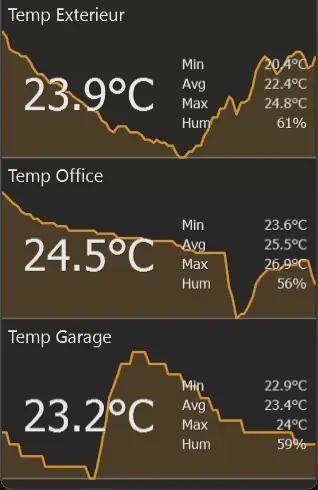
Capteurs de température. Suivez les relevés de capteurs TP-Link Tapo à l’extérieur, au bureau, au garage ou dans d’autres pièces.
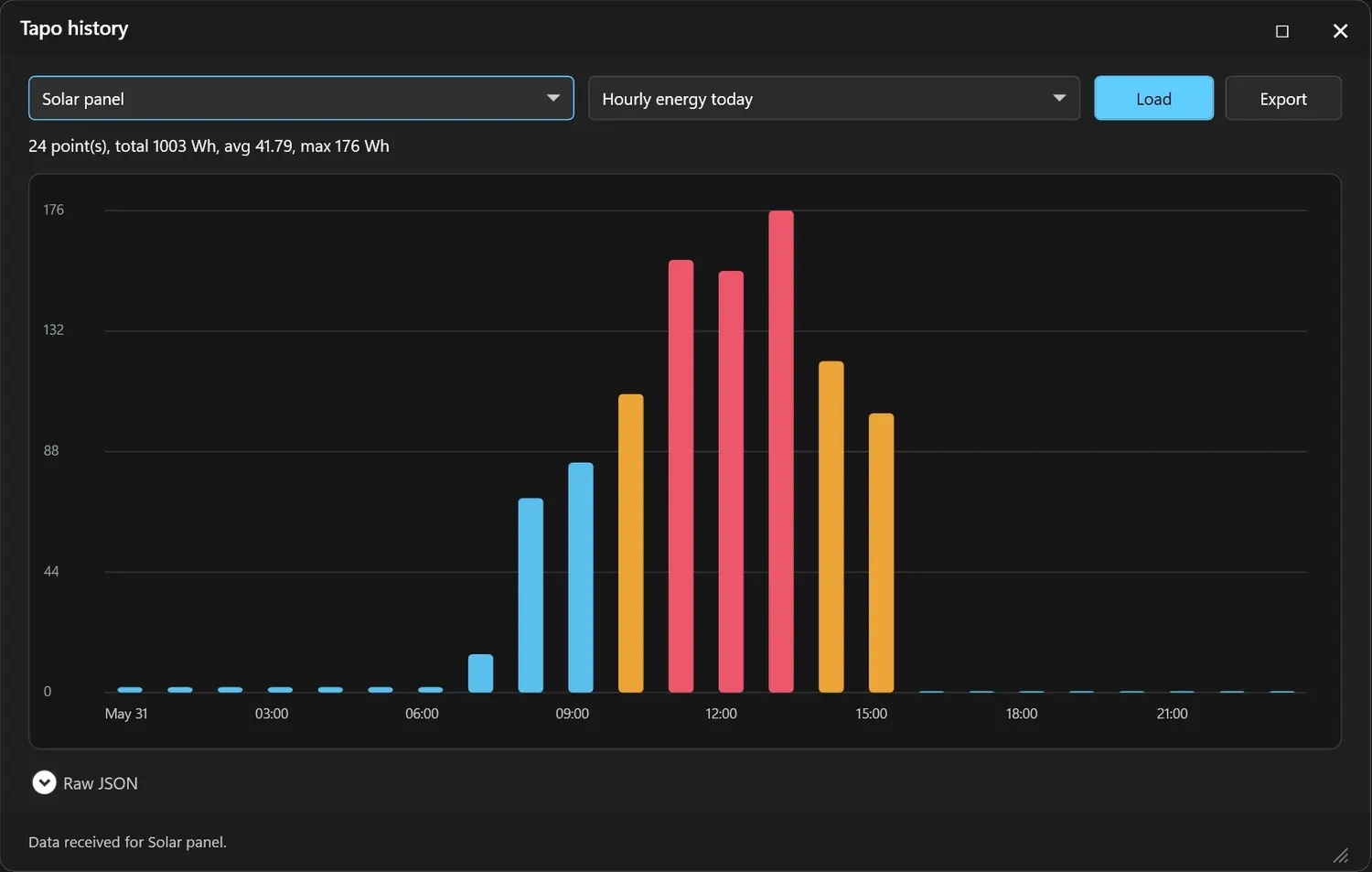
Exportation d’histoire. Récupérez les relevés de vos prises et capteurs par date, année, mois ou jour, puis exportez les données CSV depuis votre ordinateur.
Moniteur de bureau gratuit pour vos prises Tapo et capteurs de température
Téléchargez, connectez vos prises ou capteurs de température Tapo, et récupérez des données en temps réel et historiques depuis le confort de votre ordinateur.
Téléchargez TapoPanel gratuitement (Mac)
Fiches Tapo compatibles et capteurs de température
TapoPanel prend en charge les fiches de surveillance d’énergie TP-Link Tapo et les capteurs de température/humidité Tapo. Les références courantes des capteurs incluent Tapo T310 et Tapo T315 ; TP-Link liste ces capteurs comme dispositifs nécessitant un hub, généralement utilisés avec un hub Tapo tel que le H100.
Les noms des modèles peuvent varier selon le pays. TapoPanel est destiné aux fiches de surveillance d’énergie TP-Link Tapo ainsi qu’aux capteurs de température/humidité ; suggérer des modèles supplémentaires sur le Forum.
Besoin d’une prise d’alimentation Tapo ?
Si vous ne possédez pas déjà une prise compatible avec le suivi de consommation, le Tapo P110 est le point de départ le plus simple pour TapoPanel.
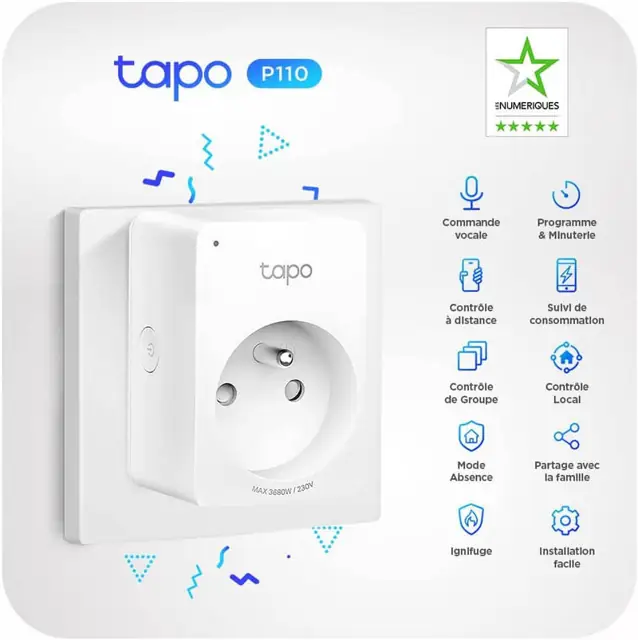 Tapo P110
- ✓Mesure la consommation d’énergie en temps réel en watts
- ✓TapoPanel compatible, Alexa & Google Home
- ✓Wi-Fi 2,4 GHz – Pas besoin de moyeu
- ✓16A / 3680W – Chauffage, chauffe-eau, installation de bureau
- ✓Deux fiches dans la boîte
TapoPanel FAQ
Des réponses courtes pour ceux qui comparent TapoPanel, l’application mobile Tapo, la surveillance de bureau Mac et Windows, ainsi que les tableaux de bord domotiques plus lourds.
TapoPanel est-il gratuit ?
Oui. TapoPanel est un téléchargement gratuit sans abonnement et sans publicité. Il fonctionne sous Windows 8, 10 et 11, et une version Mac est également disponible.
Qu’est-ce que TapoPanel ?
TapoPanel est un utilitaire de bureau qui affiche les relevés en temps réel des prises connectées TP-Link Tapo compatibles, ainsi que la température et l’humidité des capteurs Tapo, directement sur votre ordinateur.
Quels appareils Tapo supporte-t-il ?
TapoPanel prend actuellement en charge les fiches de surveillance d’énergie Tapo P110, P115 et P110M, ainsi que les capteurs de température et d’humidité TP-Link Tapo tels que Tapo T310 et Tapo T315.
Puis-je surveiller plusieurs prises et capteurs en même temps ?
Oui. TapoPanel est conçu pour afficher plusieurs appareils dans un seul panneau compact, tels que la production solaire, les écrans d’ordinateur, le chauffage, l’eau chaude, les capteurs de température et les équipements toujours allumés.
Est-ce que TapoPanel remplace Home Assistant ?
Non. Home Assistant est une plateforme d’automatisation complète. TapoPanel est un écran Windows léger destiné aux personnes qui veulent principalement des données de consommation en temps réel sans maintenir un serveur domestique connecté.
Est-ce qu’il affiche les watts en temps réel et la température ?
Oui. Les prises d’énergie peuvent afficher les relevés actuels en watts et les données graphiques récentes ; Les capteurs de température peuvent afficher la température actuelle, l’humidité, ainsi que les valeurs minimales, moyennes et maximales.
Puis-je récupérer l’historique de mon ordinateur ?
Oui. TapoPanel peut charger les données historiques de vos prises et capteurs par date, année, mois ou jour, puis exporter des fichiers CSV depuis le confort de votre ordinateur.
Ai-je besoin d’un hub ?
Aucun hub Tapo n’est nécessaire pour les prises connectées compatibles. TP-Link liste les capteurs de température/humidité Tapo T310 et Tapo T315 comme dispositifs nécessitant un hub, généralement associés à un hub Tapo comme le H100.
Quels systèmes de bureau sont pris en charge ?
Le téléchargement actuel de TapoPanel cible les utilisateurs de bureau Windows et est listé pour Windows 8, Windows 10 et Windows 11. Une version Mac est également disponible.
TapoPanel est-il affilié à TP-Link ?
Non. TapoPanel est un utilitaire indépendant édité par ObviousIdea et n’est pas affilié, approuvé ou sponsorisé par TP-Link.
Pour l’automatisation de toute la maison, Home Assistant est une alternative puissante.
ObviousIdea participe au programme d’affiliation Amazon UE. Les liens produits peuvent générer une commission sans frais supplémentaires pour vous.